Sunday, 10 May 2015

Download Rounds for PC to make Video Chat & Group Calls : Windows XP 7 8 and MAC

Posted by Unknown
 Download Rounds for PC : Rounds Free video chat app is developed by Rounds Entertainment ltd. It is an free to use Video, Text chatting application  developed for Android and IOS mobile OS. Not just video and text but you can use this app to great extent as well. It has been loaded with some of the amazing features that you are going to like now. You can Video and Text chat with friends and family anytime. It does not require separate account creation allowing you to login with your Facebook directly. It uses our Smartphone or Webcam in order to do Video chatting with Wi-Fi or Internet connection enabled.

Download Rounds App for PC : Android Windows and iphone

Download Rounds App
You can add friends to group chat, voice chat, live chats, play different fun games as well. You can also do different activities such as Watching YouTube videos, Take pictures from Video chats, share your Pics and Scribble your friends pictures for fun. You don't have to pay for any charges other than your Wi-Fi or Internet. It is very easy to use because it has been designed with a very light Interface, easy to navigate and awesome designed as well.
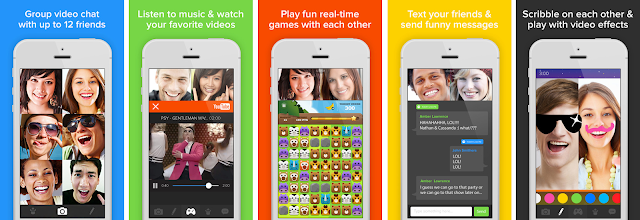
Rounds Video Chat & Group Call App Features

Rounds free video chat is a free application that can be used to do free video and group call to your friends and family. It is free to use app which has tons of features in it. I will discuss some of its features now.
Download Rounds for PC
  • Easiest way to video chat with the ones you want
  • Connect with family and friends instantly with Facebook login directly
  • Send unlimited text messages and do video conference together
  • You can also sing karaoke, use YouTube and listen to music
  • Allows to take pictures will video chatting with others
  • Uses your Wi-Fi or Internet connection to work
  • It is very easy to use with great UI and User interface

Download Rounds Free Video Chat App for PC Windows XP / 7 / 8 

Bluestacks Android Emulator can be used in order to run any Android OS game on PC. Likely we can run this App on PC using Bluestacks as well. So, Let me show you how to do it.
Download Rounds for PC
  • First you have to download Bluestacks emulator for PC and Install it
  • Next search for " Rounds Free Video Chat" app using search bar
  • After that you have to click on install and wait till sometime
  • Now after sometime the app will be completely installed
  • You can run it from your Apps Menu now

Download Rounds Free Video Chat App for MAC OS

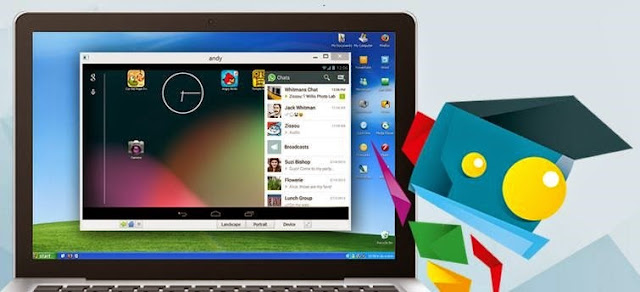
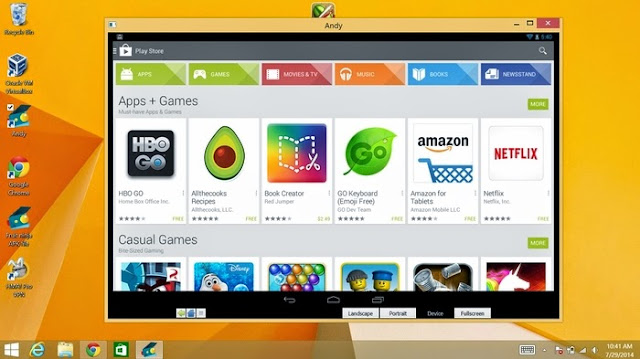
Andyroid emulator creates an Interface between Android and Mac OS. Then it can run an Android based game or App on Mac OS easily with no error. I will show you how to download this app for Mac using this emulator.
Download Rounds for PC
  • Firstly you've to download Andyroid Android emulator for Mac from here
  • Now step towards installing process following on screen steps
  • Later search for "Rounds Free Video Chat" app and click on install
  • Now the app will be downloaded and next it starts to install
  • Wait for the installation to be completed and apps appears in menu then
  • Finally you can run Rounds Free video chat app on Mac OS

Gmail Login www.Gmail.com | Sign up to Create New Account

Posted by Unknown
Gmail Login: In this modern world of high end internet mailing is one of the easier and secure way to reach our people we behold. Gmail is an free mail service provided by Google. Gmail has been doing pretty well since its start initially from 2004 after its beta version.

It was created by Paul Buchheit According to statics there are more than 425 million users registered on Gmail till June,2012.It is considered to be one of the best mailing service with amazing features like attachments,images,links,pictures and external cloud storage too.

Every file you send can be up to an size of 25 MB while you can also attach an cloud storage link of any size. Gmail drive is another service provided along with Gmail to store things online.You can use this online storing facility to save things which are more than 25 MB and send them through your account.Every newly registered users gets an allotted storage space up to 15 Gigabytes and can be expanded by upgrading by plans.

GMail Login at www.gmail.com


Gmail has easily outranked all other mailing services online like Hotmail(outlook),Yahoo mail now.Though Hot mail and Yahoo mail are still doing good business but they are not so enormously growing out there like Gmail.The only reason it has reached the number one position is because of the features provided by them.

www.Gmail.com Features

Let's  have a look at the compelling features of Gmail.com
  • Gmail Drive Free Storage The best part about joining Gmail service is that Google owns it and they are best at business.So, they have come up with an excellent added service along with Gmail which is G Drive to provide extra cloud storage facility from Google.You will be given 15 Gigabytes of free storage and you can upgrade later up to 30 Terabytes.
  • Inbox Tabs and Category LabelsThe newly updated category classification allows you to separate promotions,social and updates into different tabs.
  • Customizable ThemesYou can now customize your them by selecting from color, HD, Custom , Classic themes.They provide you more than 30+ potential themes. 
  • Group Chat You can chat with a number of friends by simply adding them to any chat.There are restrictions on the chat/messaging service.
  • Voice CallsWhile Gmail is growing enormously as a mailing giant, they are also providing basic services like Voice calls for free.You don't need to pay anything for the video calls made thorough gmail.com.
  • Group Hangouts/Google Hangouts  Group hangouts is a video gathering program or initiative by Gmail which is similar to webinars.You can create an video hangout on any topic and add up to 10 different friends.
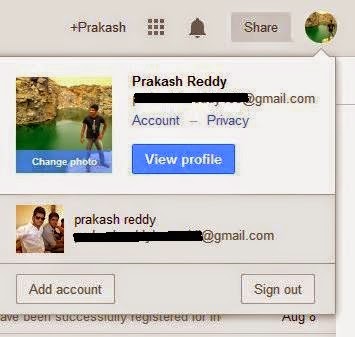
  • Switch Multiple Accounts I would say this update is really an useful one because it allows you to change from one account to another without logging off.You can add multiple accounts by clicking on " add Account"
best gmail tricks and features

Gmail.com Sign in and Registration 

  • Now we are going to learn how you can create an Gmail account wit in minutes.
  • Firstly you have to visit their homepage by clicking here
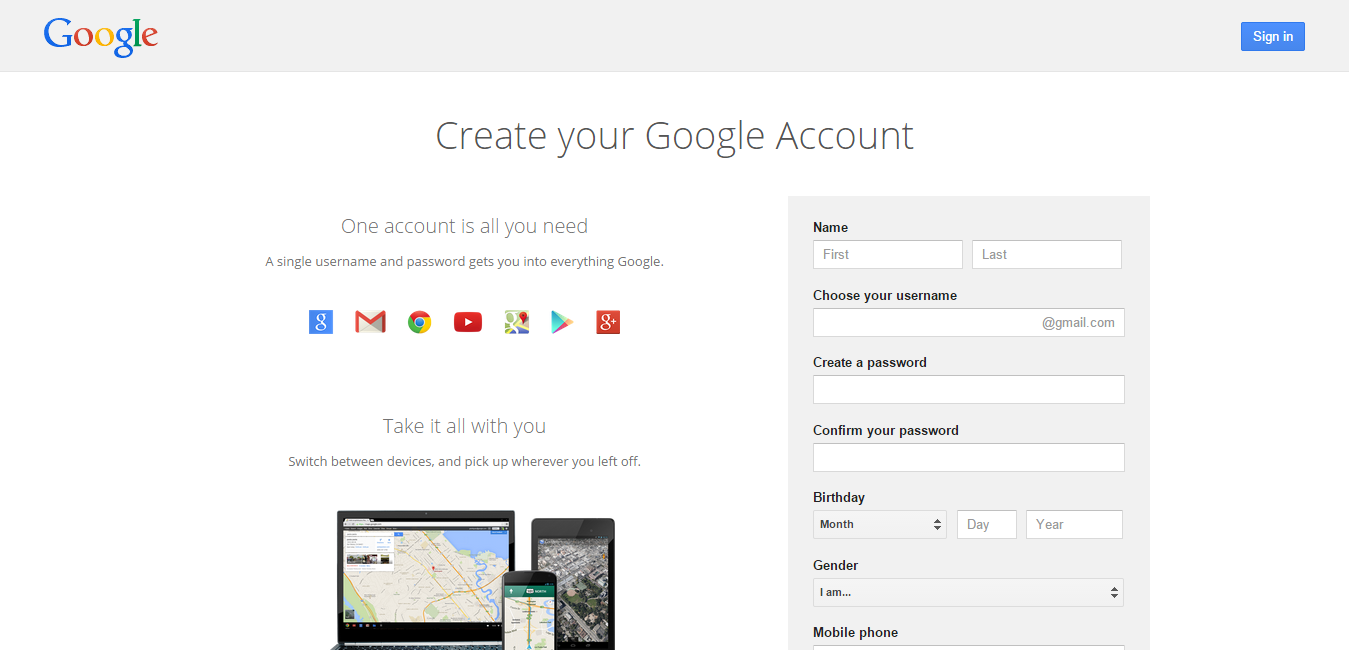
  • Then you will land on their homepage and then click on " Create an account"
  • Now you will be taken to their Account creation page where you have to fill the below form to create your account

  • Now click on continue button until you see " Account Created Popup"
  • Finally your Gmail account is created and now you can login using your new ID  and password.

Gmail Login

  • After creating the Gmail account , you have to login to use it
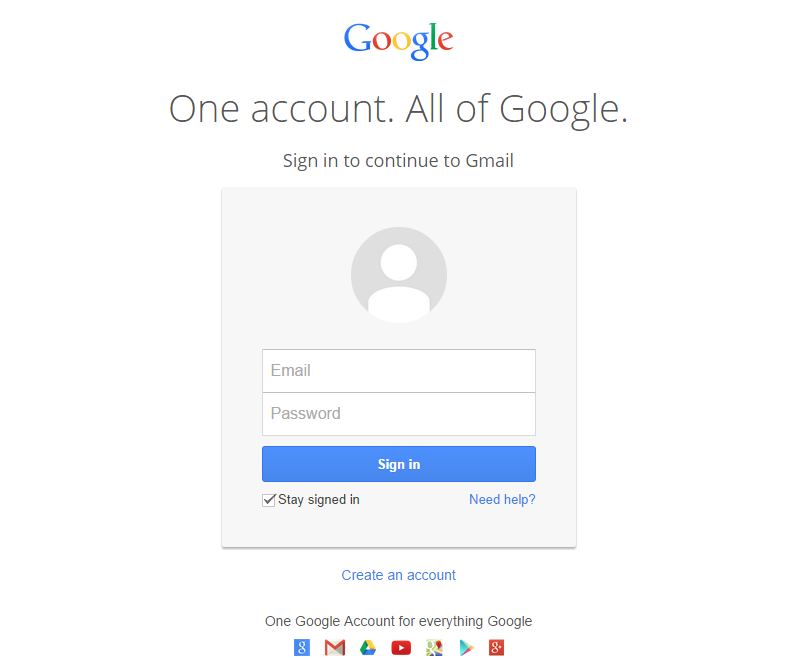
  • Now go to www.gmail.com and then enter your email id in first blank ,Password in second blank
gmail.com login
Please Stay Tuned and Bookmart to our site for more Tips and Tricks.If you have any doubts Feel Free to Comment below. We will get back to you as soon as possible

Saturday, 9 May 2015

Download Iron Man 3 The Official Game for PC Laptop Windows XP 7 8 & MAC

Posted by Unknown
Iron Man 3 game is a endless pacer Iron man game based on movie. You can now become Billionaire tony stark with his high tech advanced suits and weapons. You can now step into shoes of Iron man and play like him never before with incredible responsive game play. Iron man is the peacekeeper of the world who is now on duty to stop threats that cause destruction and hunt down enemies in his Iron suit. You can complete different missions and level throughout the game as Iron man with his powerful abilities. You can destroy different A.I.M forces all over world. Before beginning your fight you can try to take test and perfect yourself in three different world locations like China, New York and Malibu. You can come across 4 evil epic villains from Iron Man comics and fight them to death.

Download Iron Man 3 The Official Game for PC :

Download Iron Man 3 The Official Game for PC
This game has cutting edge 3D graphics which makes it perfect for playing and incredible to play. The game graphics and game play is crazy with missions making you feel like real iron man. The game controls are very responsive too with just swipe and touch screen controls to use. You can play as 18 different iron man suits which can be upgraded and used in later part of the game.
Must See: Download UFC Game on PC
You can upgrade your powers with research lab to kill your enemies much easier. To be frank this is really an epic game which gives you total control to be real Iron Man and fly your ways. The game surroundings are very natural and you can find different ways hit, defend and complete your missions.

Iron Man 3 Game Features

Iron Man 3 game is adopted from original movie which was released long time now. It has great features which makes it a perfect action shooter game. 
Download Iron Man 3 The Official Game for PC
  • Great game graphics with 3D features
  • Highly responsive and can be played on Smartphones, Tablets too
  • Play as 18 different iron man suits
  • Fight against 4 villains from real movies
  • Experience free play fling in skies as Iron Man

Download Iron Man 3 Game for PC on Windows XP 7 8

Iron man 3 game is released for IOS and Android OS only. It cannot be directly played on PC so we will use Bluestacks emulator. It can run any android game and app on PC easily. I will show you how to download and run this game on PC.
Download Iron Man 3 for PC
  • Firstly we will have to Download Bluestacks for PC
  • Then install it on your PC using on screen guide 
  • After that search for "Iron Man 3" game and click on install button
  • Now the game will be downloaded and next it will start to install
  • You have to wait till the game is installed completely
  • After installation it will appear in your apps menu
  • Finally open the game and start playing Iron Man 3 on PC!
Must Check : Download Steam Offline Installer for PC

    Download Iron Man 3 Game for MAC

    Andyroid Android emulator can be used to run Android games and apps on MAC OS platform comfortable. I will show you how you can download Iron Man 3 game for MAC OS using Andyroid emulator.
    Download IronMan Game for PC
    • You have to download and install Andyroid android emulator from here
    • Next search for "Iron Man 3" game using their search bar
    • Then select the corresponding game from search list and click on Install button
    • Now game will be downloaded and next it will start to install on your MAC OS
    • Finally you have installed Iron Man 3 game on PC and start playing it now

    Thursday, 7 May 2015

    Hotstar App Download for PC Laptop - Hotstar live Windows Android | IOS Mobiles

    Posted by Unknown
    Hotstar Live App TV Movie and cricket App is developed for mobile platform to watch your favorite TV series and Movies Live.HotStar bring you all TV shows which are telecast on TV Channel. User just need to download HotStar Live App on your smartphone to have full fun of watching their favorite shows for free without any sign up or registration to respective channel.
    It also Updates us with latest Movie Catalogue weekly with Bollywood amazing starts like Salman Khan, Hritik Roshan, Sharuk Khan and many other with full length for free.  It bring you close with latest running TV series like Diya aur Bati hum, Saathiya, Yeh hai Mohanbatein , Saddaq Haq and Gumraah and it also have the full length of past serials like Kyunki Saas Bhi Kabhi Bahu thi, Sarabhai vs Sarabhai, Khichdi and many more.

    Hotstar Live App Download : Watch TV Movies Cricket Free

    Download hotstar app for pc
    Hotstar supports with many popular languages whose series and Movies have been audited to everyone for free with full episode. Many past films which have been released are been updated on Hotstar. It provided streaming link through which you can download your favorite show or movie to watch it Offline later. It uses very data to download any video.


    Hotstar App Features:
    • Watch video even with your 2G Data.
    • Stream your TV shows, Movies and Live cricket for free.
    • Download any video for free with your week Network also.
    • Can resume shows to watch them later.
    • Save your favorite shows and Movies in Playlist.
    • Rate the content shown ,so that you get better content in feature.
    • Get greatest video and audio quality.

    Download HotStar Live App for PC on Windows and MAC

    Here is Live app to watch daily serials with full episode. HotStar is an amazing app developed for android devices. Using this we can watch live series of any shows, Movies and Cricket in any language show has been released. Bluestacks is an Android PC emulator through which we can download and install HotStar on PC/ Laptop. Here we will now show how to download HotStar for PC/Laptop using Bluestacks.

    Download HotStar Live App for Laptop Free

    YouWave is an Android PC Emulator. It is an Best emulator which can be replaced by Bluestacks. Using YouWave we can download and install any Android Apps on Laptop / PC easily. HotStar Live App can be download on our PC using YouWave emulator and we can enjoy watching Live show,Movies easily. Here we will show you how to download and install HotStar Live using YouWave on PC.
    hotstar app download
    • Firstly download and install YouWave on PC.
    • Now Open YouWave and search for "Hotstar Live"
    • Click on install button and wait for installation process
    • After completing installation App icon will appear in YouWave menu
    • Now open HotStar Live from Menu and start Using it

    Download HotStar Live App for MAC PC

    The Live App to watch Tv, Movies and cricket HotStar Live is only available for mobile Platform. Using Andyroid Emulator which is an Android MAC Emulator we can download and install HotStar Live app on our MAC device. Here are the steps to download Hotstar Live App on MAC using Android.


    Download hotstar
    • First of all download and install Andyroid on MAC device 
    • Now search for ''HotStar Live'' In Andyroid search bar
    • Then Click install button and wait to proceed
    • Now App icon will be present in your menu
    • Open HotStar App from Android menu and start watching live shows.

    Download Hotstar App for Android Windows and IOS Mobile Phones

    Here are the direct links to download hotstar app for android windows and iPhones for free
    Download Hotstar for Android - Click below to 

    Download Hotstar for Iphone -Click below to

    Download Hotstar for Windows- IS not Available yet !!!
      
      Please feel free to comment below your views about our guide to download Hotstar Apk for PC and Mobile phones to enjoy watching all TV shows for free.

        Wednesday, 6 May 2015

        Download Cygwin Offline Installer for PC Laptop - Windows XP 7 8

        Posted by Unknown
        Download Cygwin Offline Installer for PC : Cygwin is Unix like computer based compatible environment. It is a command line interface developed for Microsoft windows version. So, by featuring the same environment like Unix it runs on Windows OS. This is a free software that can be downloaded by anyone and use for software development works. Through this programmers and developers can create many working apps easily. This tool make it easy to launch different Cygwin based tools and applications within the compatible windows operating version. It is available for 32 and 654 bit version for windows OS and can be downloaded for free through different sources. The total installation space takes more than 36 GB HDD.

        Download Cygwin Offline Installer for PC - Windows XP 7 8.1

        Download Cygwin Offline Installer for PC

        Cygwin for PC Features

        So most of the users who like Unix like environment mode and version can get it now on Windows. So, it will be like a native Unix like integration with multiple features overall. You can read the features from below.It is free to download and use
        • The source code is available for free for modification
        • Support multiple color depths similar to windows 
        • Different modes like multi-windows, rootless, full screen and no decoration modes are available
        • Remote clients helps you to login to XDM easily and makes it launch more faster
        • Many icon features such as Tray icon, Start menu icon, configurable tray icon menu and it also supports resize
        • Every mode is supporting acceleration expect only the multi windows mode
        • You can use clipboard integration, it has Open GL graphics for better viewing
        Also Check : Download UFC Game for PC

          Download Cygwin Offline Installer for Laptop Windows XP 7 8

          Cygwin is available for windows in both the online and Offline installation packs. I will teach you how to download the offline installer and install it on windows./ You can follow my below steps.
          Download Cygwin Offline Installer for PC
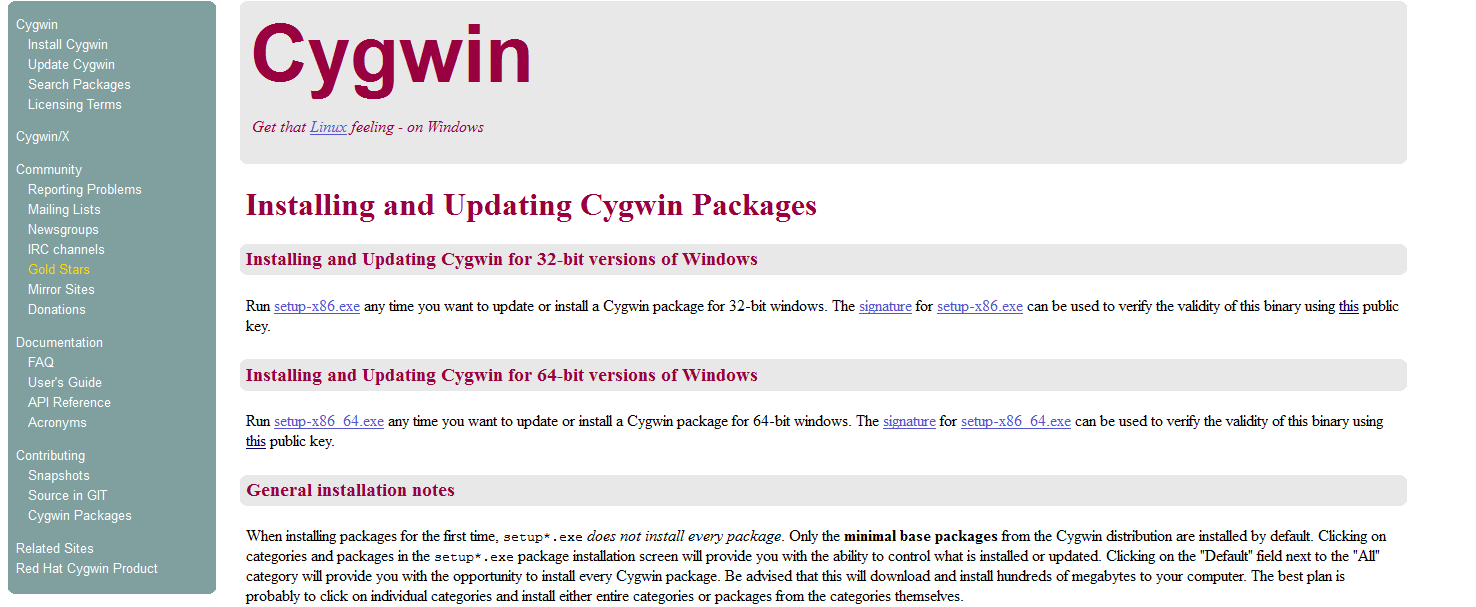
          • First you have to go to Cygwin official website from here
          • Then you have to click on " Install Cygwin" under the Cygwin
          • After that select the version of Cygwin you want to update or Install to, 
          • You have to select which Windows Bit version you are downloading
          • Then after selecting click on Setup-x86.exe and save the file on your windows PC
          • Next you have to launch the installer from desktop
          • Now follow on screen steps and install the Cygwin package!
          Must Check : Download Microsoft .NET 3.5 Offline Installer

            Download Cygwin Offline Installer from Mirror Sites

            Cygwin download links are also available through mirror sites. These links can be used by different country people based on their availability. You can download through your country mirror links. So, to download through mirror links follow below steps.
            • First you have to go to Download through Mirror links page from here
            • Then select the country mirror link available and click on it
            • Then save file and continue installation as show in above steps

             How to Verify Cygwin Package 

            After installing the Cygwin package you will have to verify it. Now to verify it you can follow belowsteps carefully.
            • You have to go to Cygwin installation page
            • Then select either 32 or 64 bit version and then click on Binary public key link
            • You can use it for verifying your package successfully!

            Download UFC Game for PC & Laptop - Windows XP 7 8.1 and MAC

            Posted by Unknown
            Download UFC Game for PC : EA Sports UFC is MMA mixed martial arts fighting game based on real MMA strategies and skills. Now you can start fighting like a real MMA fighter on your screens with your finger tips alone. You can choose over 70 ultimate warriors who are aired in MMA and can play with their superb action packed moves. You can battle from staring and skyrocket your life MMA carrier to win the World championship as well. This game has been released for most of the mobile OS platforms such as Android and IOS.

            Download UFC Game for PC Laptop - Windows and MAC

            Download UFC Game for PC
            It has creative stunning game graphics which are really accurate on both Smartphones and Tablets. It is well optimized and responsive to play on any OS. You can fight like real fighters with real action moves all over. The whole visual of the game is in HD mode which gives you a perfect look over the gameplays and action. You can earn more points in live events matches which can be played through Multiplayer modes.
            Must See : Download Super Smash Flash 2 Game

            EA Sports UFC Game Features :

            EA Sports UFC brings down the world's hardest and tough MMA fights on to your smartphone screens. You can now use your fingers tips to train exclusive fighters, start your journey to MMA world championship. Thsi game has incredible features that you can read below.
            Download UFC Game for PC
            • You can train 70 different ultimate fighters and boost their athletic skills
            • In game live events, UFC bouts will earn you some exclusive rewards
            • There are no limits to the game, play, develop, upgrade skills and move to top position in rankings
            • Play the world best MMA fights with your fingers on smartphones
            • Game controls are very responsive with great graphics
            • Whole game has action packed gameplay with great fighters with even better skills

            Download EA Sports UFC Game for PC on Windows XP 7 8

            EA Sports has released UFC fighting boxing game for Android and IOS OS for those who wants to enjoy UFC on smartphones and Tablets. This game can also be played on PC using Android emulators as we cannot run Android games directly I will be using Bluestacks android emulator in order to run this game on PC.
            Download EA Sports UFC Game for PC
            • Firstly you've got to download Bluestacks Free and Install it on PC from here
            • Next you need to search for "EA Sports UFC" game using their search bar
            • After that click on Install button after selecting the game
            • Now the game will downloaded and next it starts to install
            • Wait till the game is completely installed on our PC
            • Finally you have installed it and its icon appears in Apps Menu
            • Start the game from menu and enjoy playing UFC
            Also Check : Download Sonic Dash for PC

              Download EA Sports UFC Game for MAC OS

              Andyroid android emulator can be used to run different Android games and Apps on both the PC & MAC platforms. Most of us do have Mac and we cannot run Android apps, games on it. SO, I will show you how to run this game on Mac using Andyroid.
              Download EA Sports UFC for MAC PC
              • First download the Andyroid android emulator for MAC from here
              • Then install it following the on screen guide
              • Now search for game "EA sports UFC" and click on install button
              • Next wait till the game is completely installed after downloading
              • Finally you have installed UFC game on Mac and now you can run it!
              Note : EA Sports UFC Game for Android is available for Free on Google Playstore.

                Monday, 4 May 2015

                Download Sonic Dash for PC & Laptop [ Windows XP 7 8 and MAC ]

                Posted by Unknown
                Download Sonic Dash for PC : Sonic has been one of the popular comic character whom everyone knows. Sonic Dash is a free running game which features different sonic characters. Now you can simple  play as the fastest hedgehog sonic in this free 3D run game with free environment. This game has been released for Android and IOS OS. You can play as different Sonic character which also include his friends.

                Download Sonic Dash for PC - Windows XP 7 8.1

                Download Sonic Dash for PC
                To control sonic can swipe over your screen so that he slides and jumps over obstacles. So, the game controls are pretty responsive and easy to use while the game offers different Sonic boosts and other features to make our run easy. You can battle Dr.EggMan, the fierce scientist villain from Sonic series. While running you have to keep away from Bombs that might kill you and also collect rings during your play. Rings can be used later in the game for upgrade and much more. You can collect mystery-powers which might unlock different boosts and upgrades.

                Sonic Dash Game Features

                Sonic Dash is a free run game where you slide, dash, jump over obstacles collecting coins all the way helping sonic the hedgehog. Let me extol some of the features below.
                Download Sonic Dash for Laptop
                • This game has a very interesting Gameplay filled with creative animations 
                • The game environment is 3D filled making it easier to run anywhere unlike other free run game which are 1D
                • Defeat different enemies including Mr.EGGMan
                • Collect Rings and Stars during the run to make upgrades
                • Play different Sonic and Friend character like Tai, Shadow and Knuckles
                • Sonic has amazing abilities to run, hit, slide, jump and furious homing attack
                Must See : Download Super Smash Flash 2 for PC

                  Download Sonic Dash Game for Laptop - Windows XP 7 8

                  Bluestacks is a free to use emulator that can run Android games on PC. So, I will be showing you how to run Sonic Dash game for PC using Bluestacks below.
                  Download Sonic Dash for Windows 7
                  • First you have to download Bluestacks emulator for PC
                  • Next you have to search for "Sonic Dash" game using search bar
                  • Now select the corresponding game and click on install button
                  • After that game will be automatically download, then it starts to install later
                  • Later the game will be installed and it will show up in "Apps Menu"
                  • Now you can start the game from menu and enjoy playing it

                    Download Sonic Dash Game for MAC PC

                    Sonic Dash has been released for IOS and Android but not yet for MAC OS. We have to use Andyroid android emulator to run it on MAC easily.
                    Download Sonic Dash for XP
                    • First download the Andyroid Android emulator for MAC OS from here
                    • After that install it by following the on screen steps clearly
                    • Later search for game "Sonic Dash" and then click to Install it
                    • Then the game will be download and install it sometime
                    • Wait till installation is completed and game icon appears in menu
                    • Now double click on Sonic Dash game icon and start playing it  
                    I Hope you find it easy with this tutorial how to play Sonic Game on your PC or Laptop with the Following Operating Systems like Windows XP 7 8 and MAC.